About this icon set
Fancy Flower Icons is a collection of 20 beautiful icons for Mac OS X showcasing both cultivated and wild flowers. This icon set is freeware.

Changing the icon size
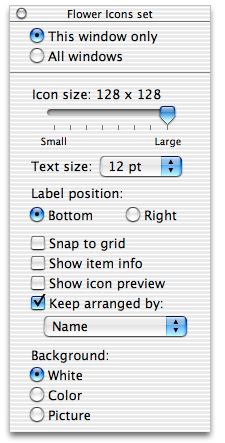
To change the size of the icons, go to the Finder and choose View-->Show View Options. You will see a menu that looks like the one below. You will probably want to check the button "This window only" which will only change the current window as opposed to every window. Then, use the slider to change the icon size (up to 128x128).
Adding the icons to other files and folders
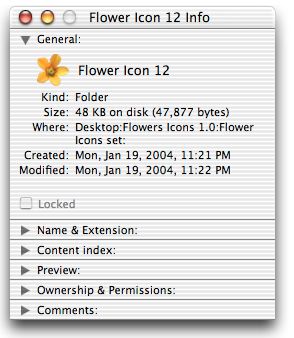
To change the icon of a file or folder, first, click on the icon you want and choose File-->Get Info. You should see a window similar to the one you see below. You will see a small view of the icon in this window. Click on it once to highlight it, then choose Edit-->Copy. After doing this, choose Get Info for the icon you want to change and then click once on that icon and choose Edit-->Paste.
Legal issues
The icons are provided "as is" and no guarantee is made as to their function or any problems that occur as a result of their use. All icons are copyright 2004 David Hanauer. All rights reserved.
Warranty
There is no warranty for these icons.
Feedback
I would love to hear any feedback about problems, bugs, suggestions, complaints, etc. and if you like it I'd definitely like to know that too!
Send e-mail to David Hanauer hanauer@umich.edu
These icons can be found at http://www.SuperMagnus.com
___________________________________
May 19, 2004